
Leafy Corner Plant Compendium Guide — Read Traits & Unlocks
Use the in-game compendium as a current plant record, then cross-check the fields that matter for the next request.
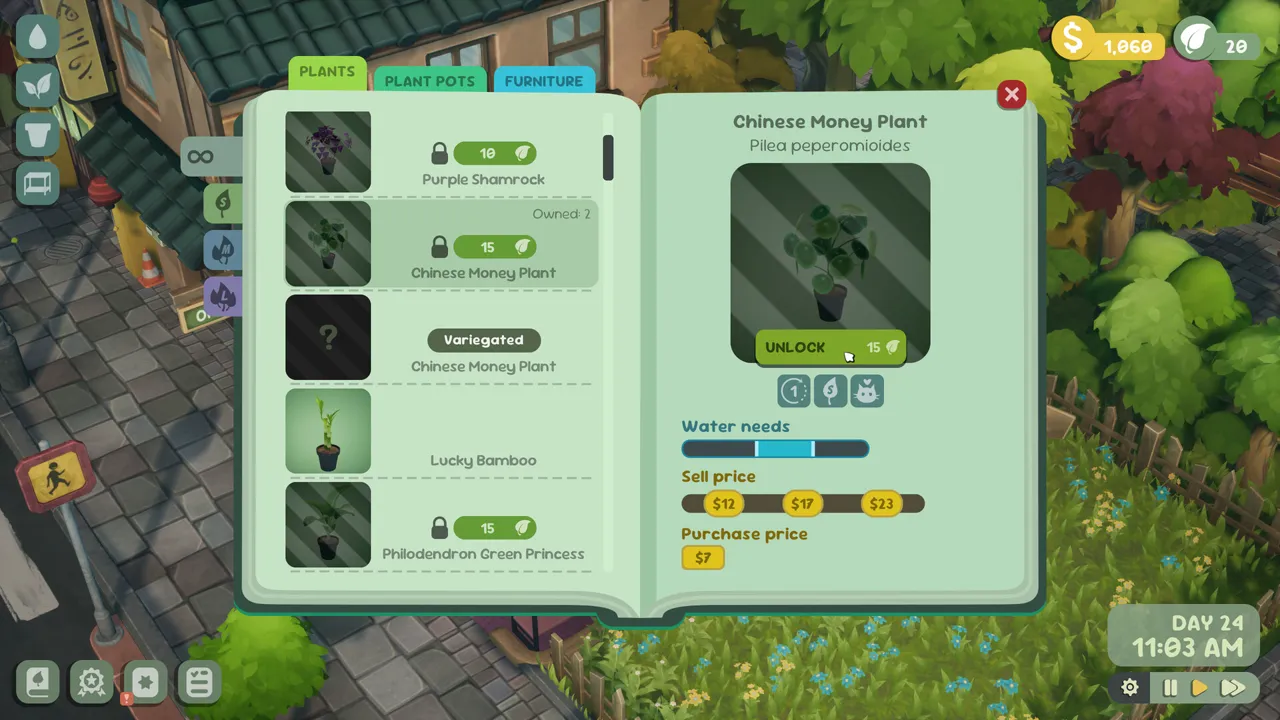
Table of contents
The in-game compendium is the safest place to check a plant before spending an unlock or promising it to a customer. Treat each entry as its own record: read what is visible for that plant and do not fill a blank with real-world plant knowledge.
Read the plant record in a useful order
- Confirm the common name so you are looking at the intended plant.
- Read the highlighted size class. Size can decide whether a request matches and how much display room the mature plant needs.
- Check only the request-trait icons that are actually present. Pet-friendly, shade-tolerant, succulent, and observed-variegation fields are useful only when the selected record establishes them.
- Compare the juvenile, developing, and mature values as three visible growth stages. They are not a profit formula and should not be treated as a player- controlled price list.
- Read the current purchase value or Plant Token requirement immediately before confirming an unlock, because economy values can change.
An absent field is not the same as a negative answer. If a record does not show the trait you need, leave that match unresolved instead of assuming the plant fails or passes the request.
Use the compendium before a request or order
Start with the customer's complete condition set, then inspect possible plants. A plant that matches size but not the second visible trait is not a complete answer. For a faster shortlist, apply the same checked conditions in the Plant Request Matcher, then return to the in-game compendium before choosing stock.
This site currently publishes eight checked plant records. The broader in-game catalog is not silently filled with guessed rows, so the game remains the current authority when the plant database has no verified entry.
Connect unlocks to the job in front of you
Before spending Plant Tokens, identify the missing capability: a size class, a visible request trait, or a plant needed by the current progression goal. Then unlock one record that clearly closes that gap. Pots and decorations can be useful shop choices, but they should not be counted as plant unlocks when the reputation panel specifically asks for plants.
Use the Plant Tokens guide for the claim-and-spend loop, and check customer requests when dialogue needs to be translated into traits first.
Keep changing values current
Static cost tables become unreliable after balance changes. Use this guide for the reading order and decision process, but use the value and requirement shown in the current compendium for the final purchase. This preserves a useful workflow without pretending that one captured economy is permanent.
Related guides
Leafy Corner Plant Tokens Guide — Earn, Claim & Spend
Claim task rewards, spend Plant Tokens on visible unlocks, and avoid purchases that do not advance the current goal.
Read guideLeafy Corner Plant Request Matcher
Select visible request traits and get an intersection-only shortlist from eight checked plant records.
Read guideLeafy Corner Customer Requests — Read Traits & Choose a Plant
Translate a customer’s wording and symbols into checked traits before choosing a plant.
Read guide